1) Open Binance or your crypto app
Open Binance or any crypto wallet that supports withdrawals on BNB Smart Chain (BEP20).
Choose your plan, copy the wallet address, send the exact amount, then paste the TXID so your payment can be verified and your key delivered automatically.
You can browse plans freely, but creating the order, verifying payment, and receiving the key requires Google sign-in.
Time starts on first successful activation.
Send the exact amount on BEP20 / BSC only.
Create an order first. The QR code, address, and exact amount will appear here.
After sending the payment, paste your Transaction Hash / TXID here.
Shown only after account ownership and payment are verified.
Your key will appear here immediately after successful blockchain verification.
Follow these steps carefully to complete your purchase without delays or mistakes.
Do not add extra cents to cover the network fee. Type the exact amount shown in the order. If the platform deducts 0.01 and shows 9.99 received instead of 10.00, our system will accept it automatically within the fee tolerance.
Open Binance or any crypto wallet that supports withdrawals on BNB Smart Chain (BEP20).
You must choose BEP20 / BSC only. Sending on any other network may make the payment impossible to verify.
Copy the receiving address shown on this page and paste it into the withdrawal address field. Do not change any character.
Enter the amount exactly as shown in your order. Do not add extra cents to cover the network fee. If you type 10.00 and Binance says the receiver will get 9.99, that is correct and accepted.
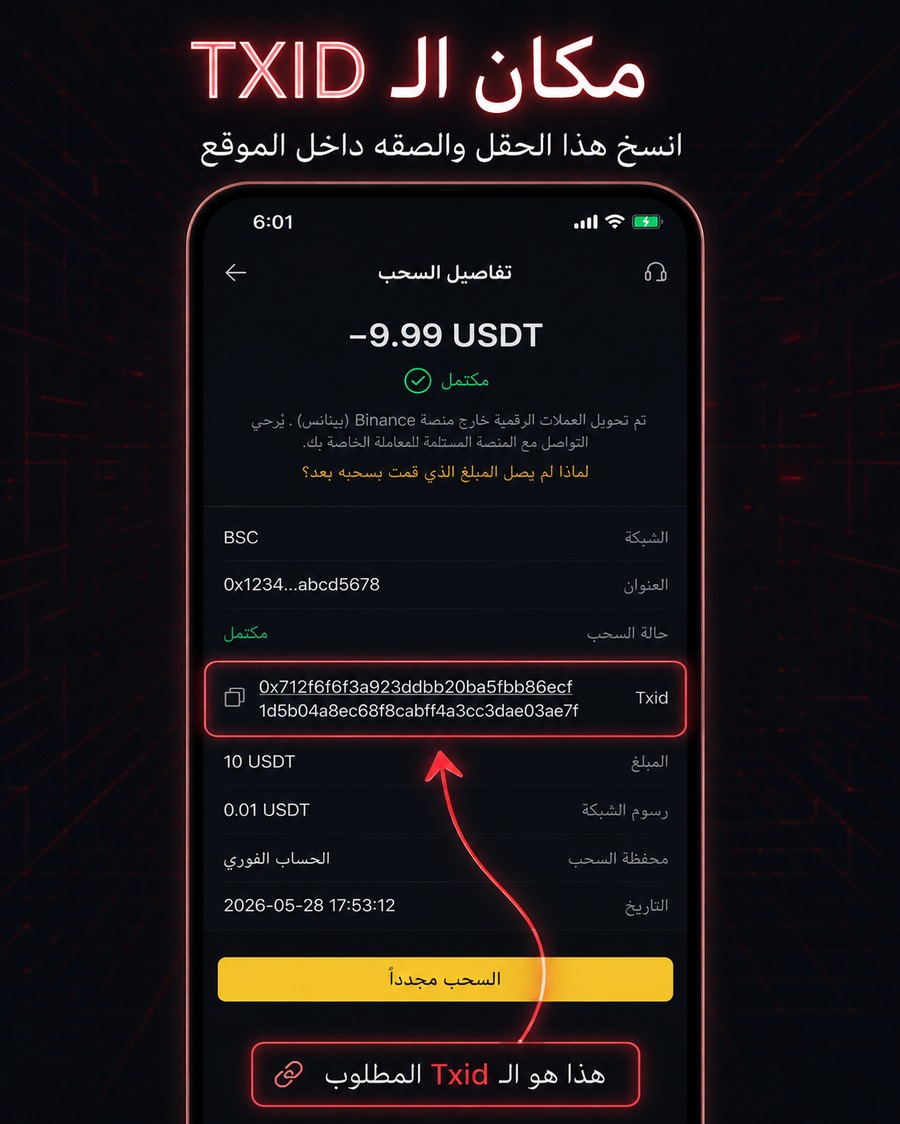
Once the withdrawal is completed, copy the Transaction Hash / TXID from the transfer details and paste it into the verification field on this page.
In Binance, open the withdrawal details screen and find the Txid field inside the transaction information. Copy the long string, usually starting with 0x, then paste it here.